


EdgeAura
3.9903.00 Reviews
App Specs
- Version
- 1.26.30
- Updated On
- License
- Free
- Downloads
- 1,000,000+
- Developer
- Zachary Holt
- Categories
- Personalization
- Platform
- Android
Screenshots
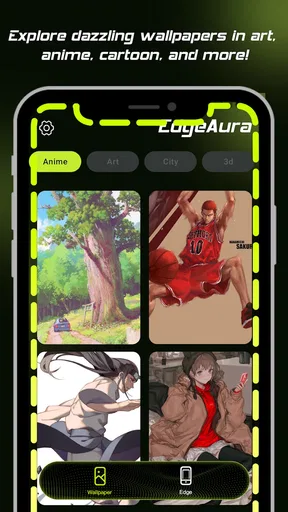
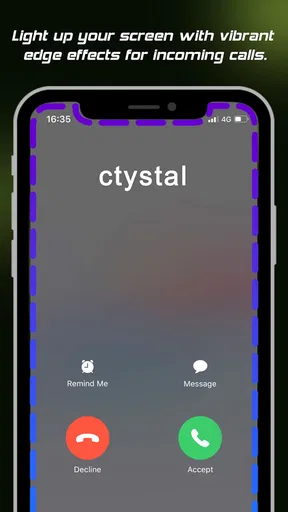
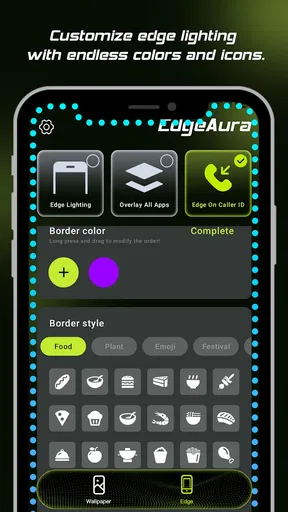
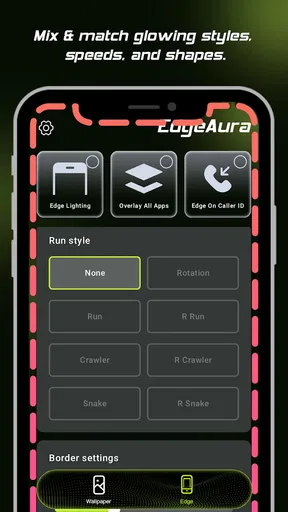
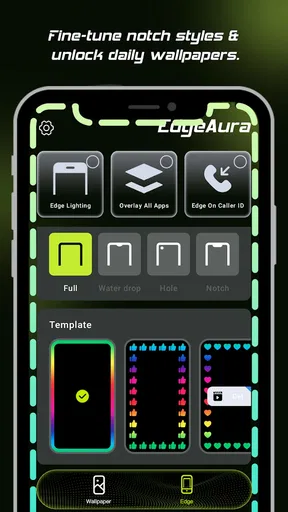
 Analysis by AppCompare
I judge edge-lighting apps less by their first flashy demo than by whether I can live with the effect after the novelty wears off. The useful test is simple: can I recognize a notification at a glance, keep the look comfortable in a dim room, and still use my phone normally? EdgeAura is built around that balance, pairing screen-edge effects with wallpaper and caller-screen personalization. I see it as a visual layer for people who enjoy tuning their phone’s appearance, rather than a tool that changes how the phone works.
Start with a restrained baseline
My advice is to begin with one edge color and a modest effect, then use the phone for an ordinary day before changing anything else. That gives you a fair sense of whether the glow is genuinely useful or simply distracting. A bright animation can look appealing while you are choosing it, but become tiring when it appears repeatedly beside messages, calls, or other alerts.
Once the basic look feels right, I would add only the distinctions that solve a real problem. If assigning colors to apps suits your habits, reserve a small set of clearly different colors for the apps you check most. The practical benefit is quick recognition; the trade-off is that too many colors become a code you have to remember. A few consistent choices are easier to read than a different effect for every notification.
The same gradual approach works for the wallpaper and caller-screen elements. Change one part at a time, then check whether the finished screen still feels coherent when you unlock the phone or receive a call. These visual pieces share the same display, so a vivid edge effect can compete with a busy wallpaper. A simpler background often gives the glow room to stand out without making the whole screen feel crowded.
Getting to Know EdgeAura
So, what exactly is EdgeAura? In simple terms, it’s a personalization app that turns your phone's edges into a colorful, glowing interface. But calling it just that doesn't do it justice. Imagine having a mini light show every time you get a notification or charge your phone. It's like having your own personal disco, minus the awkward dance moves.
Features That Shine
First off, let's talk about the customization options. EdgeAura offers an array of colors and patterns that can be adjusted to your liking. Whether you want a subtle glow or a vibrant flash, this app has you covered. You can even set different colors for different apps, which is a neat trick if you're a multitasker like me.
Another standout feature is the battery optimization. Initially, I was worried about the app draining my battery quicker than a kid with a candy stash. But surprisingly, the developers have done a fantastic job. The app runs efficiently in the background without sucking your battery dry.
Worth Reading Before You Choose

EA SPORTS FC Mobile 26 Is a Bigger Football Game, but It Takes Time

Flipboard Shows What News Apps Must Do Beyond the Feed

Switching to Android Auto Means Rethinking Your Driving Routine

Google Calendar Makes a Crowded Week Easier to Manage

Ludo King Makes the Most of the Minutes Between Plans

Baby Panda World Brings Quick Play to Modern Phones, but Its Game Library Feels Busy
Settings I’d check before settling on a look
EdgeAura comes from developer Zachary Holt and sits in the phone-personalization space, where appearance apps compete for attention with launchers, icon packs, and static wallpaper tools. It has a 3.6 average from around 1,700 ratings, so I would approach it as a specific visual preference rather than an automatic recommendation for every phone owner. The app is free to install, with optional in-app purchases ranging from $1.99 to $24.99 per item; I’d explore the free experience first and decide whether a paid extra addresses a look I actually want.
Before relying on edge effects, check the choices the app presents during setup and make sure the display treatment suits your device. Screen shape, bezels, and the wallpaper behind the effect all influence how visible an edge glow feels. On a phone with a curved or particularly narrow-looking border, a restrained setting may read clearly; on another screen, the same effect may be less noticeable. I would judge it on my own device instead of assuming a preview tells the whole story.
It is also worth checking the balance between visibility and comfort. If you use your phone in bed or in a dark room, a strong animated border can draw more attention than the notification deserves. I would start dimmer or calmer where those controls are available, then increase the presence only if I keep missing alerts. That makes the customization serve a purpose instead of turning every incoming message into a miniature interruption.
Easy Peasy Setup
Setting up EdgeAura is a breeze. Even if technology isn't your best buddy, this app holds your hand through the process. You just download it, follow a few simple steps, and voilà, your edges are glowing. The interface is intuitive, and the instructions are clear as day.
Make the effect part of a repeatable routine
A useful habit is to settle on a small number of visual rules and leave them alone for a while. For example, I might use one calm color for everyday alerts and a more noticeable one for the apps I genuinely need to spot quickly. If I keep changing colors whenever I feel bored, the distinctions stop being useful. A stable setup is easier to recognize at a glance and less likely to make the screen feel constantly busy.
For a realistic daily pattern, imagine checking your phone between errands while it stays in a bag or rests face down on a desk. An edge effect can make a notification more visible when you glance over, but it cannot tell you whether the message matters; the color is only a cue you choose. I would use it to notice that something arrived, then decide whether to pick up the phone, rather than treating the light as a reason to interrupt whatever I am doing.
The caller-screen styling is best considered separately from notification colors. A look that feels playful when you are customizing the home screen may not be the look you want during a work call or a quick conversation with family. I would test the overall presentation in the situations I actually encounter and favor legibility over decoration. That small check can prevent a visually exciting setup from feeling awkward in everyday use.
The User Experience
Now, let’s talk about how EdgeAura performs in everyday use. I've been using it for a few weeks, and honestly, it feels like my phone got a major upgrade. The glowing edges give a futuristic vibe that’s both cool and functional. I find myself actually looking forward to notifications just to see the colors dance around my screen.
Moreover, the app is surprisingly lightweight. It doesn’t slow down your phone or interfere with other apps. It just quietly does its thing in the background, adding a touch of flair to your device.
Compared with a launcher or icon pack, this is a more focused way to personalize a phone: it changes the visual impression around the screen rather than reorganizing apps and navigation. Static wallpapers are usually the simpler alternative if you want color without ongoing motion, while a launcher makes more sense if your real goal is changing the home-screen layout. I would choose EdgeAura when the edge treatment and related screen styling are the part I want to customize, not when I am looking for a complete interface overhaul.
Where the limits matter
Animated visual effects are inherently more noticeable than a still background, which is both their appeal and their main trade-off. If you prefer a quiet screen, keep notifications unobtrusive, or find repeated motion distracting, this may not be the right personalization app for you. Likewise, anyone seeking functional notification management rather than a visual cue should look to the phone’s built-in controls and use this app only if appearance is an additional goal.
Compatibility is another sensible checkpoint. EdgeAura requires Android 8.0 or later, so it is not an option for a device running an older version. The app is rated for Everyone, and it has passed one million installs, but those broad facts do not guarantee that every phone will display the effects identically. I would try the setup on the phone I plan to use and pay attention to how it feels during normal use before investing time in a detailed color scheme.
There is also a practical distinction between installing for free and deciding to spend. Optional purchases fall between $1.99 and $24.99 per item, so I would not treat every customization as part of the no-cost experience. Since the app is already easy to assess visually, my approach would be to establish a basic look first, identify exactly what feels missing, and only then consider whether a paid item is worthwhile. The current version is 1.26.22, and I’d keep expectations tied to the experience on the device in hand rather than assume every future change will suit my preferences.
Room for Improvement?
No app is perfect, and EdgeAura is no exception. While the customization options are fantastic, I’d love to see more patterns and perhaps some seasonal themes. Imagine having snowflakes gently falling down your screen during winter or leaves swirling in the fall. That would be pretty epic.
Also, if you’re using an older device, you might notice a slight lag when switching between apps. It's nothing major, but something to keep in mind if your phone is already on the slower side.
For that reason, I would avoid stacking every available visual choice just because each one looks appealing in isolation. A busy wallpaper, a strong edge animation, and an elaborate caller screen can compete for attention. I’d make the edge effect the main accent, keep the rest of the screen comparatively calm, and then revisit the setup after using it for several days. That is a more reliable way to spot actual friction than endlessly adjusting settings in one sitting.
People who want an always-changing theme or a comprehensive home-screen redesign may be happier with a different kind of personalization tool. EdgeAura’s appeal is narrower: it is for someone who likes the idea of a visible glow and wants to shape its appearance. That focus is a strength when it matches your taste, but it also means the app is easy to skip if you would rather keep your screen static or uncluttered.
Wrapping Up
In conclusion, EdgeAura is a delightful addition to any smartphone. It adds a pop of color and a level of personalization that makes your device feel uniquely yours. It's easy to use, doesn’t drain your battery, and just brings a smile to your face every time you see those glowing edges.
So, if you're looking to add some pizzazz to your phone, I highly recommend giving EdgeAura a whirl. Trust me, once you go glow, you never go back!
Who I’d recommend it to
I’d recommend trying it if you enjoy making a phone feel personal, notice visual alerts more readily than sounds, and are happy to spend a little time finding a restrained look. It is particularly appealing when you want more than a static wallpaper but do not want to replace the whole home-screen experience. If you prefer minimal screens, dislike animated effects, or mainly want better organization, I would skip it and choose a calmer wallpaper or a launcher that addresses that specific need.
My final test would be to use one simple setup through a normal day: check whether the effect is easy to notice, whether it clashes with the wallpaper, and whether it remains comfortable in the places you use your phone. If those checks go well, the customization has earned its place. If the glow becomes another distraction, turning back to a static look is not a failure; it is simply the better fit for your habits.
Pros
- Intuitive user interface for easy navigation.
- High customization options for personalization.
- Seamless integration with other apps.
- Efficient resource usage
- saving battery life.
- Regular updates with new features.
Cons
- Occasional crashes on older devices.
- Limited offline functionality.
- Some features locked behind a paywall.
- Advertisements can be intrusive at times.
- Requires a stable internet connection.
FAQs for EdgeAura
What features does EdgeAura offer to enhance user experience?
EdgeAura provides a wide range of features designed to enhance user experience, including customizable edge lighting notifications, a variety of themes, and an intuitive interface. Users can personalize their device with unique light patterns and colors that respond to notifications, calls, and messages, making it both functional and visually appealing.
Is EdgeAura compatible with all Android and iOS devices?
EdgeAura is designed to be compatible with most modern Android and iOS devices. However, some older models or devices with specific operating system restrictions may not support all features. It is advisable to check the app's compatibility on the Play Store or App Store before downloading to ensure a seamless experience.
Does EdgeAura consume a lot of battery life?
EdgeAura is optimized to minimize battery consumption by using efficient coding and allowing users to adjust settings to their preferences. While any app with visual effects can impact battery life, EdgeAura offers options to reduce brightness and duration of effects, helping to manage battery usage effectively.
Are there in-app purchases or ads in EdgeAura?
EdgeAura is free to download but includes optional in-app purchases for premium features and additional customization options. The free version may contain ads, but users can opt for a one-time purchase to enjoy an ad-free experience and unlock exclusive features, providing flexibility depending on user preferences.
How user-friendly is the interface of EdgeAura for beginners?
EdgeAura boasts a user-friendly interface with easy navigation and clear instructions, making it accessible for beginners. The app includes a setup guide and tooltips to help new users customize their experience effortlessly. Whether you're tech-savvy or not, EdgeAura is designed to be intuitive and straightforward.


